Version 3: Back to OCR -This Time For Real

The coordinate grid was DOA. Back to square one.
Python powered OCR would be the only way forward.
I have to get this right. If you are working on a car, guessing doesn't cut it. Accuracy is everything. Get a torque spec wrong, and you snap a bolt inside an engine block.
But instead of trying to become a computer vision engineer overnight, I decided to use an established solution created by someone way smarter than me: EasyOCR.
Why reinvent the wheel, right?
EasyOCR is a proven, open-source Python library built specifically for reading text in images. No messy algorithms, no manual contour filtering. You just feed it an image, and it hands back the text along with the exact pixel coordinates.
Suddenly, the pipeline became incredibly clean.
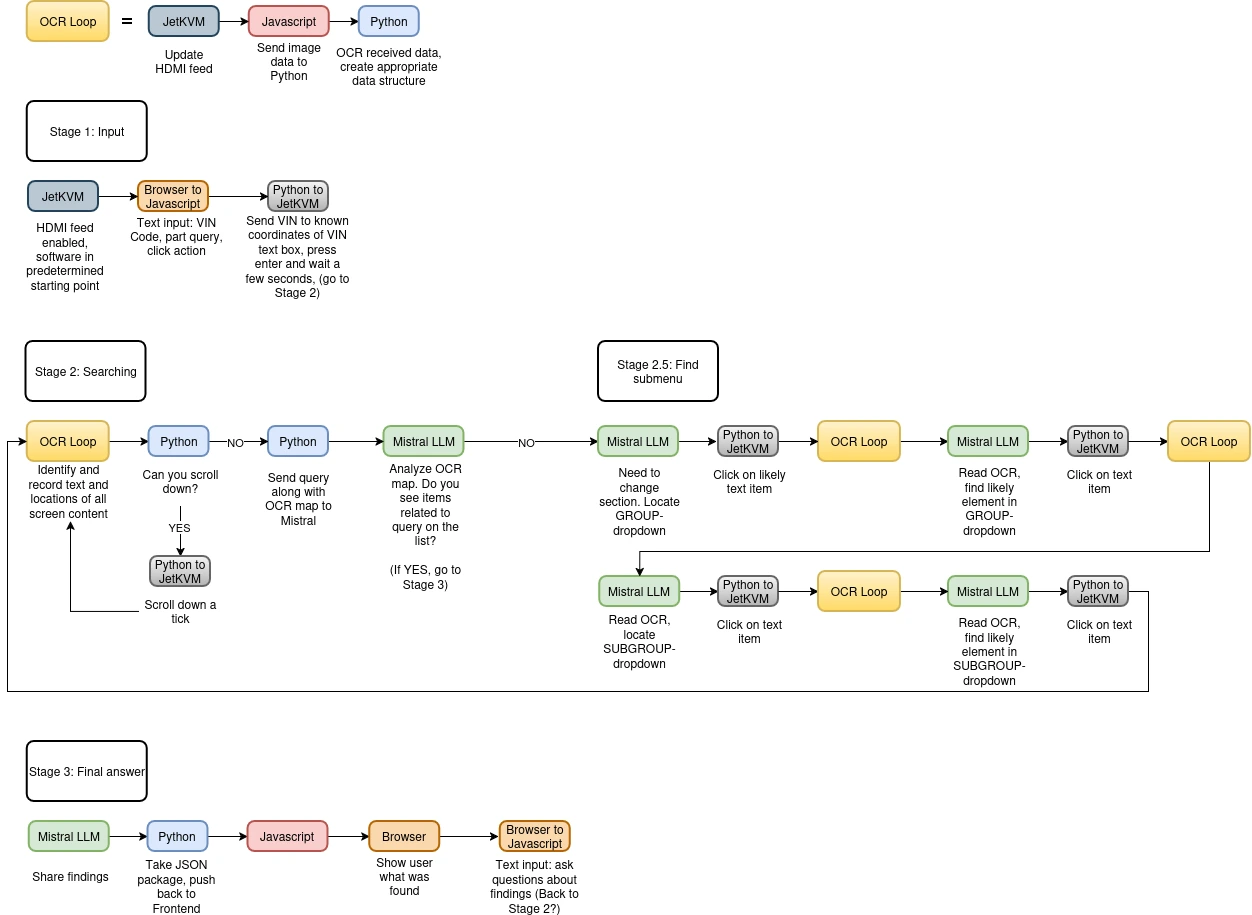
- The JetKVM grabs the screenshot.
- Python hands the screenshot to EasyOCR, which extracts the text and maps out the exact pixel coordinates for every word on the screen.
- The LLM acts purely as the brain, reading the text data to decide what to do.
- Python commands the JetKVM to click the exact coordinates EasyOCR found.
For the first time in this entire project, I looked at the workflow and smiled. This might actually work.
This is the blueprint I used as a starting point for my tech demo. You can read the full breakdown here.